PDA

View Full Version : EY.o 2.0 - Upgrade & Bug Report


Sean Engle
08-03-2007, 05:03 PM
This thread will have on-going discussion about the new site. Please feel free to post your comments and questions.

To visit the new site during construction please follow the link below, and thanks again for your support of www.EricsonYachts.org (http://www.EricsonYachts.org)!

www.EricsonYachts.org/home.php (http://www.EricsonYachts.org/home.php3)

//sse

Sean Engle
08-03-2007, 05:04 PM
Under the new site, everyone who wishes to download docs will need to be logged into the Information Exchange. The galleries, projects, and links will also be under this new system.

Why? Well, because it's more helpful for us - more secure and gives us an idea of who's visiting, etc. (remember the hacking incident in 2004?). It also helps with respect to our being able to offer more stuff since it's not going out to the 'general public'.

The new site will also offer more in the way of regional stuff, images from rendezvous, ericson gear, etc. You can visit the new site and watch it's progress via the link below - although the Information Exchange you see won't have the new colors - you won't see that until we go live with it in a few months...:

www.ericsonyachts.org/home.php (http://www.ericsonyachts.org/home.php3)

Sean Engle
08-20-2007, 12:13 PM
Ok - summer quarter just ended, so I'll be balancing my time between house projects and the new version of the site.

If you see something that looks odd, my apologies in advance - but there will be a bit of that as I try and get this thing (version 2 of this site) wrapped up before fall quarter begins...

//sse

Sean Engle
09-19-2007, 01:50 PM
Well, the server upgrade went ok yesterday - except the new version of BSD they're running won't support .php3 - which the menu system on the new site uses....so.....

I'll have to rebuild the menu system before work on the new site can continue...:o

//sse

Sean Engle
11-25-2007, 05:20 AM
Here's some good news: After spending all day and night on Friday working on it, I've managed to completely rebuild the new menu system on the 2.0 version of the site. So...we're back to where we were before our host 'upgraded' our server (in September).

The new address of the 2.0 version of the site is:

http://www.ericsonyachts.org/home.php

:egrin:

//sse

Sean Engle
03-27-2009, 01:42 AM
I just turned it up :

EricsonYachts.org 2.0!

You may notice a number of things still left undone (Regional Pages, a few others, etc), however it is 'in the water' and reading for finishing out.

Take a look around and send me an email with any issues you see.

Thanks,
//sse

Sean Engle
03-27-2009, 12:13 PM
When some of you get the chance, please advise me on issues you see in the new site (besides incomplete-unfinished pages, I mean).

You should be seeing a new color scheme everywhere (like the attached) and a complete menu system at the top - everyone got that?

//sse

Rob Hessenius
03-27-2009, 12:43 PM
Yes, This was the 1st time that it came up, prior today it was the "old" version that popped up

Sean Engle
03-27-2009, 01:07 PM
Yes, This was the 1st time that it came up, prior today it was the "old" version that popped up

Yeah, I'm finding out some things about vBulletin's Style Manager that I was unaware of before... You should be seeing everything in a tan color now - and no more of that old aqua blue color, etc....

The only app I've found that still pulls it up appears to be Safari...but I'm working on that now as well....

//sse

Sean Engle
03-27-2009, 01:26 PM
At the very front of the site (www.EricsonYachts.org (http://www.EricsonYachts.org)) there is a new splash page graphic - made with some new morphing software I found...

Thing is causing me headaches...too big...too slow and does not auto-forward the way it is supposed to...

I'll probably end up changing it - let me know if you guys see other issues, etc.

//sse

CoryBolton
03-27-2009, 01:59 PM
Hey Sean,

Thanks for the hard work. I know how "fun" it is to make sure everything works in every platform/browser.

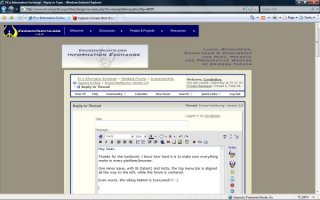
One minor cosmetic issue, with IE (latest) and Vista, the top menu bar is aligned all the way to the left, while the forum is centered. Probably some funky css thing.

But even worse, the viking helmet is truncated!!!! :)

Edit: It just seems to be the forum related pages that have the offset menu. The static pages seem to have it centered properly.

Heres a pic...

Sean Engle
03-27-2009, 02:19 PM
Hey Sean,

Thanks for the hard work. I know how "fun" it is to make sure everything works in every platform/browser.

One minor cosmetic issue, with IE (latest) and Vista, the top menu bar is aligned all the way to the left, while the forum is centered. Probably some funky css thing.

But even worse, the viking helmet is truncated!!!! :)

Edit: It just seems to be the forum related pages that have the offset menu. The static pages seem to have it centered properly.

Heres a pic...


Yeah, I know about the centering thing - that has to do with the styles templates in vBulletin also....that's being looked into right now...

The menu thing (with the helmet off center) is intentional (no rolling of eyes, please...:rolleyes:). We just felt that the helmet appears in so many places that to have it up there in a complete state would be redundant to some degree - so it was suggested to put it off center and in a different color, etc....

//sse

hodo
03-27-2009, 02:36 PM
Hi Sean, what language is the info for the regional pages written in? It comes up in something weird... starts out " Gait aut luptat ".
I like the new format, you did good, I'll tilt a porter for you!
Harold, S/V Mischief :devil: Maker

CoryBolton
03-27-2009, 03:02 PM
The menu thing (with the helmet off center) is intentional (no rolling of eyes, please...:rolleyes:).

Well, in that case it looks very modern and hip. :egrin:

And I don't think it would be a bad thing if you used the home/welcome as the front page instead of the morphing page.

Hodo- I think the gobbleygook you see is just filler text until someone has a chance to put in the real text. Either that or I need a new Universal Translator.

Jeff Asbury
03-27-2009, 03:10 PM
Beautifully layout Sean! Nice to see it going live! Thank you again for all your hard efforts!

:egrin::cheers:

Jeff Asbury

Sean Engle
03-27-2009, 03:42 PM
Hi Sean, what language is the info for the regional pages written in? It comes up in something weird... starts out " Gait aut luptat ".
I like the new format, you did good, I'll tilt a porter for you!
Harold, S/V Mischief :devil: Maker

You've never heard of the 'ApplePieese' language before, Harold??

Actually, it's common place-holding text - used in most desktop publishing and website building software. Eventually it will be replaced with -real words-, honest! :egrin:

//sse

Sean Engle
03-27-2009, 03:44 PM
Beautifully layout Sean! Nice to see it going live! Thank you again for all your hard efforts!

:egrin::cheers:

Jeff Asbury

Thanks Jeff -

I'm glad I had some free time to get this thing in the water. It will be much easier now to take care of adding images to the gallery and profiles and projects - as all I have to do is drop them into a folder, etc - and besides, the creation of the new site was stopping all work on the old one, etc...

//sse

Sean Engle
03-27-2009, 03:48 PM
Will take some work - and are still a work in progress right now. I need to correct some of the code on them that's making them hang in the menus, correct the content links within the pages themselves (the result of indecision in where to place them, their structure, etc)...

All of that will be done over the next few months...

//sse

Mark F
03-27-2009, 05:23 PM
Thanks Sean,

The site looks great! If I had to vote on the offset header/truncated helmet thing, I would vote for leaving it as is but in a slightly lighter blue... if I had to vote on it :-).

Thanks so much for all your work - this is a wonderful place to hang out.

Jeff Asbury
03-27-2009, 05:56 PM
Personally I really like the Navy Blue with the cropped Gold Logo. I think it works much better than the old turquoise background. I like the warm gray background. Soothing to look at when you look at this site as much as I do.

IMHO,

-Professional Graphic Artist / Designer for over 30 years, but what do I know.

:devil:

Sean Engle
03-27-2009, 08:24 PM
Personally I really like the Navy Blue with the cropped Gold Logo. I think it works much better than the old turquoise background. I like the warm gray background. Soothing to look at when you look at this site as much as I do.

IMHO,

-Professional Graphic Artist / Designer for over 30 years, but what do I know.

:devil:

Thank you... I, an architect-in-training-trying-to-learn-aesthetic-senseabilities-from-artist/architect-friends, really appreciate the comment... I was trying to combat my stricter side so... You should see what some of my buildings are starting to look like now... :rolleyes:

Now I need to find the switch for this pesky navy blue outline that has come up around all the frames of the forums..

//sse

Sean Engle
03-27-2009, 08:28 PM
Oh, also: the old aqua-blue style has been deleted now - so ALL you should see is this new tan style. If anyone sees anything different, please send me an email, and let me know - as jumping from one style to another is new to me....

Thanks,
//sse

ahhhh - that was an easy one.... :)

Maine Sail
03-27-2009, 10:40 PM
Site looks great. Unfortunately it seems we've lost the auto formatting for wide screen monitors. The forums are all squished to one side of my monitor? I am presuming this is just a different "skin" for v-bulletin but the formatting should be easily fixable..??

Loren Beach
03-27-2009, 10:54 PM
Site looks great. Unfortunately it seems we've lost the auto formatting for wide screen monitors. The forums are all squished to one side of my monitor? I am presuming this is just a different "skin" for v-bulletin but the formatting should be easily fixable..??

Using a 24" iMac, I now notice the same issue with the narrower page display. Not really a big deal, but the "auto format" feature was indeed nice.
There certainly is lot that goes into building and maintaining a big site like this! No wonder good web sites are rather rare.
:cool:
Cheers,
Loren

footrope
03-28-2009, 12:48 AM
Sean,

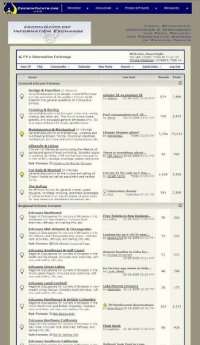
Nice color scheme. Ditto on the truncated helmet on the upper-most banner. Since I have a 17" Widescreen Macbook pro and a 22" Widescreen display, and use Safari and Firefox, I'll have some more comments. Here is a screenshot of the main Forum page and the formatting problem. Same problem in Mac Firefox 3.0.7. and Mac Safari 3.21, and Windows Firefox on Parallels 3 for Mac, under Win 2K.

It's still usable, just squished.

Also the old mainframe.htm bookmark loads the turquoise and dark blue just like the old days. The top banner persists when selecting the forums. Putting in the URL www.ericsonyachts.org by itself gets me the new splash screen - it is slow to load as mentioned above. Still kind of cool though.

The first post of a thread is strangely formatted also, but the replies are basically OK. See second screenshot. I discovered as I browsed that if a file is attached to a thread starter or a reply, the format corrects itself.

Nice work. I'm looking forward to seeing it get finished. Thanks for everything.

Sean Engle
03-28-2009, 05:38 AM
Ok - ok:

I'll un-align left the forums tomorrow - and bring them back to center (too late to do it tonight), and will find a way to make the menu (on the Info Exchange only) also center - that way you can widen the info exchange - but the other parts of the site will stay alinged left (unless you want all of it in the center?)....

//sse

Sean Engle
03-28-2009, 03:59 PM
...still usable, just squished....

Also the old mainframe.htm bookmark loads the turquoise and dark blue just like the old days. The top banner persists when selecting the forums.

...new splash screen - it is slow to load ...

The first post of a thread is strangely formatted also...


...the "auto format" feature was indeed nice.


Auto sizing issue has been settled; the window is aligned left, but will stretch the forums on larger screens. Note, however that the input windows are also back to their original size (about 550 pixels, I believe) in width - so if that's an issue, please let me know.

I'm looking into the splash screen today. The morphing software I used turned out a 28mb file - the reason for the lag. If I cannot reduce it in weight, I may change that splash screen for a static image, etc - we'll see....

I've not noticed the issue you mentioned on the first post - I'll take a look at that in a second.

There are some missing graphics on this new version of vB. Since I do all the upgrades sans graphics (as we have too many custom ones of our own), I'll have to go to their new files and yank out the images and drop them in....

Regarding the old color scheme: If you are seeing the old color scheme, you are viewing temp files on your box. So, either logout and then login again (deleting/overwriting the login cookie), and/or - better yet, just blow out all your temp internet files (always a good idea - keeps down the spyware and malware). The old color scheme (and in this case the old mainframe.htm file) have been deleted from the server. :nerd:

Loren Beach
03-28-2009, 04:34 PM
Hi Sean,
Getting changes in format to stick must be like a weird varitation of "whack a Mole!" :)
Now the width resizes on the fly, which is neat, but the labels over the columns are all stacked up on the left side again.
(sigh)

Loren

Sean Engle
03-28-2009, 04:50 PM
...width resizes on the fly, which is neat, but the labels over the columns are all stacked up on the left side again.

Done - was an issue in the table header and footer sections that Firefox picks up on....see attached.

Let me know if you see other stuff....

footrope
03-29-2009, 04:18 AM
Sean,

Even more outstanding than last night. Looks like you fixed everything I've seen that was a little out of kilter (with a nod to Hodo).

My Project finally splashes on Thursday, April 2nd.
:cheers:
Thanks Sean!

msFootrope
03-29-2009, 04:38 AM
From the home page, I clicked on the splash screen to view all of the possible screens and got the following message:


msFootrope, you do not have permission to access this page. This could be due to one of several reasons:

Your user account may not have sufficient privileges to access this page. Are you trying to edit someone else's post, access administrative features or some other privileged system?
If you are trying to post, the administrator may have disabled your account, or it may be awaiting activation.
I was able to view the splash screens on the old web site, so I'm not sure what's happening here. I'm running IE 7.0. :(

Upon further exploration, it appears that I cannot get to any of the four galleries nor any of the owner & project pages. It seems like my account is messed up somehow. Craig can get to all of these pages.

Oh, other than that, so far I like the new site!

Sean Engle
03-29-2009, 04:57 AM
From the home page, I clicked on the splash screen to view all of the possible screens and got the following message:


msFootrope, you do not have permission to access this page. This could be due to one of several reasons:
Your user account may not have sufficient privileges to access this page. Are you trying to edit someone else's post, access administrative features or some other privileged system?
If you are trying to post, the administrator may have disabled your account, or it may be awaiting activation.

I was able to view the splash screens on the old web site, so I'm not sure what's happening here. I'm running IE 7.0. :(

Oh, other than that, so far I like the new site!

Hi Ellen -

Oh, that's probably just the permissions setttings (as you have multiple authority levels) on the downloads hack that rides on the vB software...I'll check that in the morning. Let me know if you can hit anything else out there (projects, boat galleries, etc).

Thanks,
//sse

noproblemo2
03-30-2009, 02:21 AM
Wow Sean, you have been busy "remodeling" this siite. As an "old timer" here I was surprised to see the changes, but I do like it. Great job, Thank You..:cheers:

Sean Engle
03-30-2009, 04:31 AM
...it appears that I cannot get to any of the four galleries nor any of the owner & project pages...other than that, so far I like the new site!


Wow Sean, you have been busy "remodeling" this siite. As an "old timer" here I was surprised to see the changes, but I do like it. Great job, Thank You..:cheers:
Thanks for the compliments, both of you. Ellen, I looked at the software, and the moderators needed to be selected on several of the permissions - however your account had only the moderators permissions - so I reversed them so that you have all the ranks (moderators and the standard user rights) - so you should be set (either that, or it will be really screwed up - I guess we'll find out which, eh? :egrin:)

My classes start tomorrow - but I'll check the board tomorrow night after dinner. If there are more issues, please advise....


Thanks!
//sse

msFootrope
03-30-2009, 10:12 PM
Hi Ellen -

Oh, that's probably just the permissions setttings (as you have multiple authority levels) on the downloads hack that rides on the vB software...I'll check that in the morning. Let me know if you can hit anything else out there (projects, boat galleries, etc).

Thanks,
//sse

Looks like you fixed the problem. I'll let you know if I have any other problems. Otherwise, the site seems to be running smoothly. I even found a couple of the pictures I submitted in the Boat Gallery. I'm definitely enjoying the new site and what I've been able to see so far. Thanks for all the excellent work you do and also for your quick fix to my problem. I feel whole again. :egrin:

sleather
04-11-2009, 02:42 PM
Sean, Love the new look!http://www.ericsonyachts.org/infoexchange/images/icons/icon14.gif One tiny little recommendation, Is it possible to enlarge, or enbolden the little arrow for the "Last Post"? It normally shows up as an arrow inside of a box on most vB sites.

Thanks

Sean Engle
04-11-2009, 07:42 PM
Sean, Love the new look!http://www.ericsonyachts.org/infoexchange/images/icons/icon14.gif One tiny little recommendation, Is it possible to enlarge, or enbolden the little arrow for the "Last Post"? It normally shows up as an arrow inside of a box on most vB sites.

Thanks

Are you talking about this tiny thing? You know - if you just click on the title of the thread in that same window, it'll take you right to the last post...

//sse

sleather
04-11-2009, 07:59 PM
Are you talking about this tiny thing? You know - if you just click on the title of the thread in that same window, it'll take you right to the last post...

//sse

Yep, that ">" little thingy. :egrin:
http://www.fishtheclassic.net/forums/search.php?searchid=276010

Title, gets me the 1st page, p3 is top, is there some setting?

Edit, OK, figured it out.:nerd: IF I'm on the site long enough(and not logged on) the update icon appears in front of the title and it goes to the latest unread posts. I clean all my cookies and stuff everyday so I'm used to using the Last Post ">" thingy w/o being logged on to the site.. ;)

Joe
08-04-2009, 08:18 AM
I notice that the two 'Tag Clouds' (one from the pull-down Search menu, the other under Advanced Search) display different lists of common tags. Any reason for this?

sleather
08-04-2009, 01:46 PM
Sean, When is the Owner/Boat Registry due back on line?

treilley
08-04-2009, 02:02 PM
Steve, use the Community/members section to get to the registry. Once in there click "Search Members" at the right and click advanced search.

http://www.ericsonyachts.org/infoexchange/memberlist.php

Sean Engle
08-04-2009, 02:47 PM
I notice that the two 'Tag Clouds' (one from the pull-down Search menu, the other under Advanced Search) display different lists of common tags. Any reason for this?

Joe -

One of the clouds is the most 'used' tags the other is the most 'searched for' cloud.

Every night the system tags new posts and indexes existing posts; and lists those most common terms in the 'used section'. The most searched for comes from a list of the requested searches.

//sse

Sean Engle
08-04-2009, 02:51 PM
Sean, When is the Owner/Boat Registry due back on line?

The data in the old register needs to be transferred, but there are issues and inconsistencies in it - so it's on the back burner. Owners are encouraged to enter their boat data in the Information Exchange profile which can be searched as cited above.

I'll have to issue an FAQ on this - as a couple of people have been asking, etc....

//sse

treilley
08-07-2009, 09:22 AM
Sean, why is it that the icon for linking a photo is sometimes missing from the edit window when creating new threads or replying to threads?

The attached jpg is from another forum that uses the same software.

Loren Beach
08-07-2009, 12:32 PM
After clicking on the "Edit" button, if you want to add or change pictures, you next click on "Go Advanced". As to the why of this for this site, I do not have an answer for you.
Hope this helps a little bit,

Loren

Sean Engle
01-26-2010, 02:49 PM
Sean, why is it that the icon for linking a photo is sometimes missing from the edit window when creating new threads or replying to threads?

The attached jpg is from another forum that uses the same software.

We try to discourage linking to images on other sites, as when those pages change, the link dies, along with the information associated with it. We prefer to have people attach images to their post whenever possible.

I've been trying to kill the attach button for years...with mixed results (the issue is in the templates for the thread input window)....

//sse

Sean Engle
06-11-2011, 04:09 PM
Sean, When is the Owner/Boat Registry due back on line?

** In EY.o Version 3.0 - --

If you go to 'Settings' in the upper right hand corner of this screen, then to 'Edit My Settings', and scroll down, you'll see the added fields for your boat information.

These fields are being populated by all owners for the last couple of years - and I am planning on making these fields searchable at some point this year (2011) - assuming we don't have any more major interruptions like that last week!

//sse

Sean Engle
06-11-2011, 04:11 PM
Hi Everyone -

This is just to close out this thread and point you to the new thread:


http://www.ericsonyachts.org/infoexchange/showthread.php?10045-EY.o-Version-3-Bug-Report-amp-Updates-Thread

As of last weekend, we took the site to EY.o Version 3.0 - and the site has changed dramatically. Please go to this new thread to see discussion and fixes for problems.

Thanks!
//sse