View Full Version : Inserting Links to other Threads
Loren Beach
02-12-2007, 01:01 PM
There is a wealth of material in these thousands of threads. Often we read a new thread and know right away of another thread (or three) that needs to be mentioned to save time -- the new participant may be just figuring out how this site works and does not yet know how powerful the search engine really is.
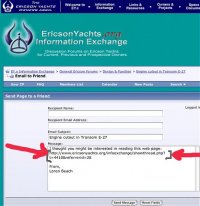
Up until recently, I was using the Thread Tools menu to send a thread link to myself in order to copy-paste that same link back into my thread reply at this site.
I noticed that the moment I open up the "email this page" part of this menu it shows the whole link URL right there. Well Duh. I can just copy that exact line of text and past it in. Much quicker.
:rolleyes:
Loren
Sean Engle
02-12-2007, 05:05 PM
Yeah, you can also just copy the thread URL from your URL window and paste it in:
http://www.ericsonyachts.org/infoexchange/showthread.php?t=4420
As long as you're showing the command and the thread number you'll pull it up, etc...
//sse
Loren Beach
02-12-2007, 08:43 PM
Sean,
You are right, but only when I open the thread from your link above. When I arrive at a thread by just entering the site and then going to Forums and then to a particular forum and then to a thread and open it....
What the URL window shows is
http://www.ericsonyachts.org/mainframe.htm
And this is not what I need.
Different browsers may handle this differently, perhaps, maybe?
:confused:
Loren
treilley
02-17-2007, 07:51 PM
Loren, you should be able to right click on the link and "copy shortcut" and that will copy the link into your clipboard. This is an IE command. Not sure if other browsers support it.
Sean Engle
02-17-2007, 08:31 PM
Sean,
You are right, but only when I open the thread from your link above. When I arrive at a thread by just entering the site and then going to Forums and then to a particular forum and then to a thread and open it....
What the URL window shows is
http://www.ericsonyachts.org/mainframe.htm
And this is not what I need.
Different browsers may handle this differently, perhaps, maybe?
:confused:
Loren
Oh, that...
We're talking about a couple of issues here:
=> Regarding the URL that's shown at the top '...mainframe.htm': That's because we're using frames on version 1.0 of the site. In that version the menu bar at the top and the Information Exchange are actually two different windows - so all you see in the URL line is the main address, '...mainframe.htm'
On the new site (version 2.0!), we're dumping the frames - so you'll be able to specify the link as above, and the entire page will come up - including the main navigation bar, etc... In that version, the navigation bar is included in the parsing of Information Exchange - so each time you load it (or any other page on the site) the menu is always at the top...
If you want to see the new Information Exchange with the navigation bar (assuming you're logged in) in version 2.0 click here:
http://www.ericsonyachts.org/infoexchange/index.php?styleid=6
//sse
Powered by vBulletin® Version 4.1.4 Copyright © 2012 vBulletin Solutions, Inc. All rights reserved.